
 All the information about the Šanko app
Know what's missing, in whose shift, the moment it happens.
- 15 min
- to train a waiter
- 1 Excel
- brings in your whole bar book
- 3
- devices: Android, Windows, browser
- 0
- internet needed during a shift
§1How it's done today
The notebook doesn't say who.
- A shortage turns up late, or never.
- Shift hands over to shift without a record.
- The owner has to be in the café to know anything.
- Adding up in a notebook takes time and goes wrong.
- Orders to suppliers are made from memory.
§2The sum
If every day drinks go missing, at KM
a month240 KM
a year2.880 KM
An example. The real loss depends on the café; Šanko shows where and when it happens, so it can be stopped.
§3How a shift works
One shift, line by line.
Every shift has its waiter. What's left at the end of one shift is where the next one starts.
- 01ULAZGoods that arrived: tap the item, type the number.Adds it to the stock.
- 02RASHODCash spent from the till, with a note (milk from the shop).Takes it off what's to hand over.
- 03STANJEThe count at the end of the shift, item by item with photos. Coffee is weighed in grams.Works out what was sold and warns when more was counted than could be there.
- 04PREDAJAKitchen total, cash and cards handed over.Shows short, over or exact before the shift closes.
- 05Closed The shift locks and can't be changed without a record. Sends the owner a message and carries the stock to the next shift. Closed
§4Who uses it
Three sides of the bar.
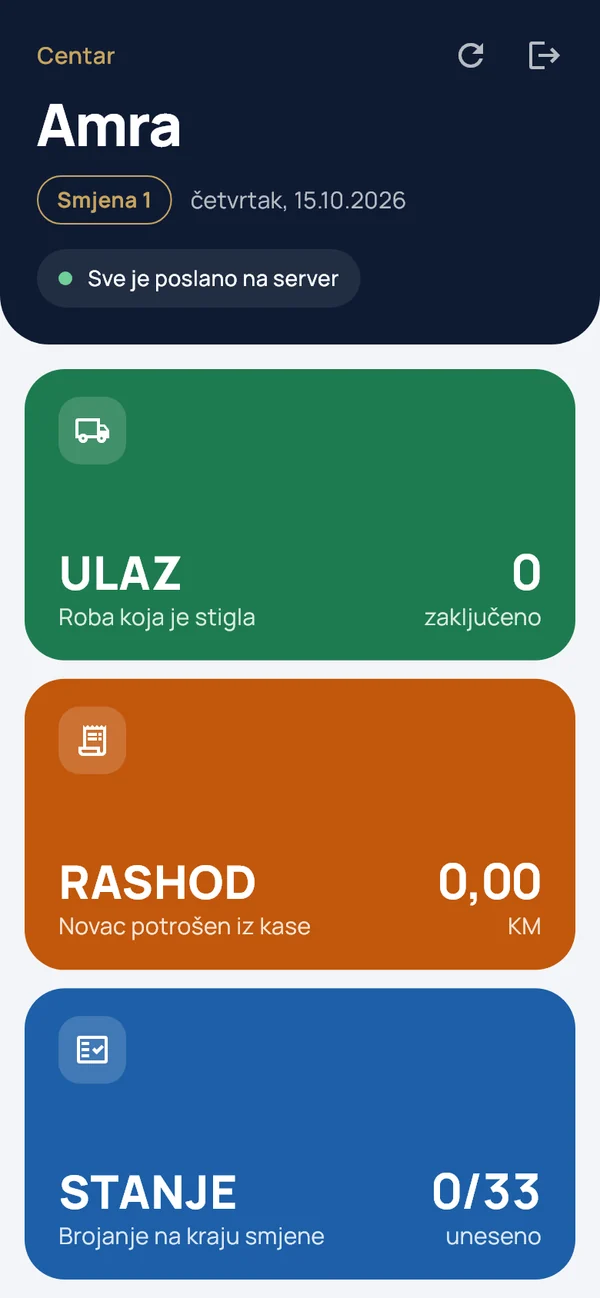
- A PIN of their own. Every waiter logs in with four digits, so you know who ran the shift.
- Four screens. ULAZ, RASHOD, STANJE and PREDAJA, done in a few minutes.
- Orders at the table. The waiter taps the order on the phone and it goes straight to the bar.
- Mistakes caught early. A count that can't be right is flagged before the shift closes.
- No signal, no problem. Everything is kept on the phone and sent as soon as the connection is back.
- Orders arrive on their own. The oldest is on top; nobody shouts across the room.
- Nothing waits too long. An order waiting more than five minutes turns red.
- One swipe. Swipe the order to the right and it's marked as done.
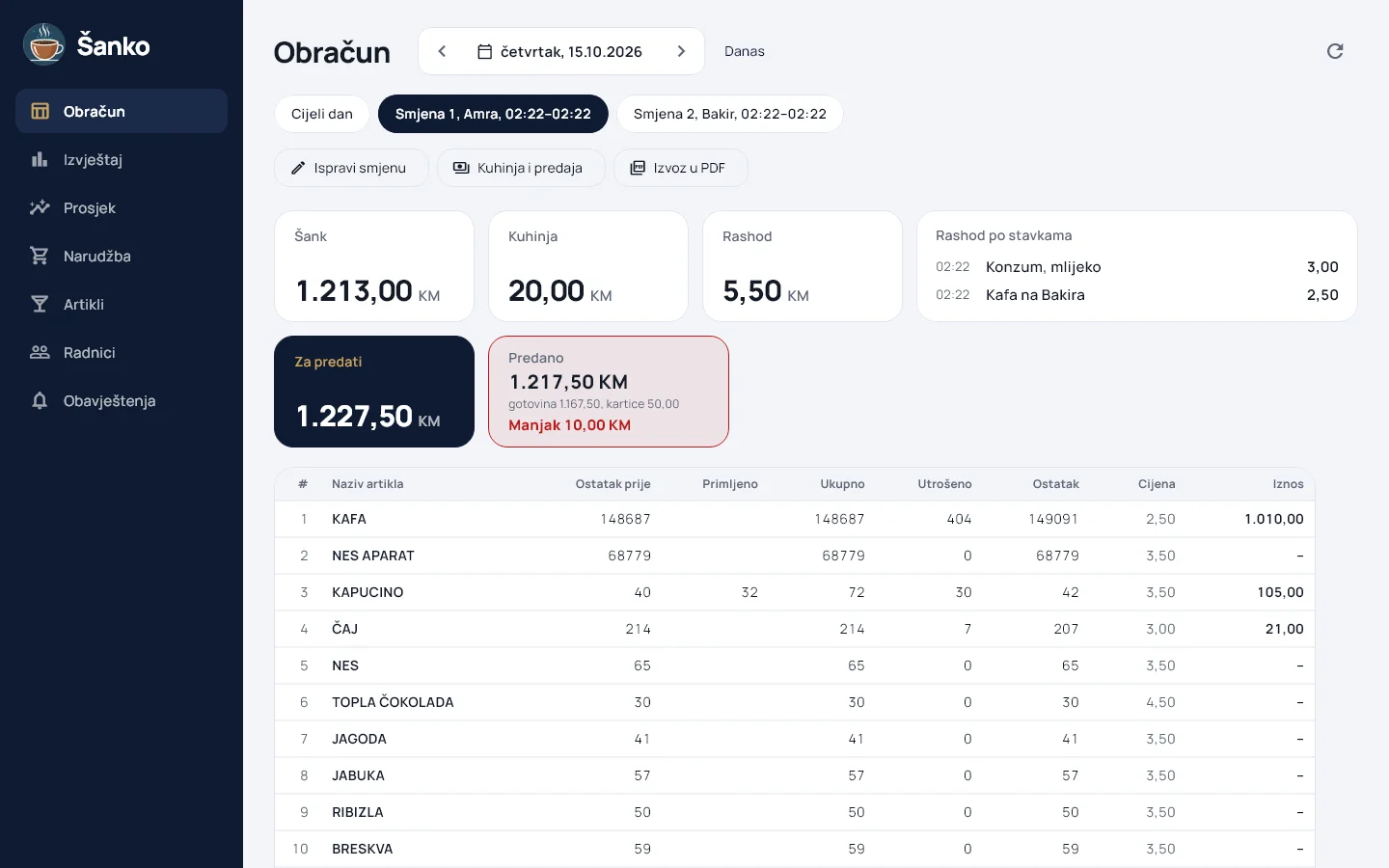
- The whole settlement. Bar, kitchen, expenses, handed over and the difference, per day or per shift.
- The same panel everywhere. On a Windows computer, in a browser or on the owner's own phone.
- Corrections on record. Fix a count or a handover; who, when, old, new and why stays written down.
- Close a shift for them. If a waiter leaves without closing, the owner closes it so the next one can start.
- More than one café. One owner account, each café with its own waiters, items and books.
§5When the shift closes
The numbers come to you.
The moment a shift is closed, the owner gets a Telegram message: bar, kitchen, expenses, handed over, any shortage, and items counted higher than they could be.
Connecting takes one click in the admin panel. Several phones or a group chat can get it, say the owner and the manager.
Šankobot
Korzo: shift 2 closed
Amra, 15.10.2026. 07:00–15:12
Bar1.213,00 KM
Kitchen20,00 KM
Expenses5,50 KM
To hand over1.227,50 KM
Handed over1.217,50 KM
⚠️ Short10,00 KM
⚠️ Counted higher than possible: KOLA, was 40, entered 42
§6The admin panel
Everything the owner needs, on one shelf.
-
Settlement
The bar book as a table: before, received, used, left, price and amount. Shortages in red, export to PDF, warnings on unusual use and low stock.
-
Monthly report
Turnover and the change on last month, the best days of the week, top items, and every waiter: shifts, shortages and suspicious counts. Export to Excel.
-
Averages
Use per day and per shift over 7, 30 or 90 days, how many days the stock will last, and counts that don't fit.
-
Items
Bring in your Excel bar book in a minute, with prices and stock. Photos from the catalogue help waiters find an item faster.
-
Supplier order
Set a minimum and an order-up-to level. When stock falls to the minimum the item joins the list with a suggested amount, ready to send on Viber or as a PDF.
-
Staff and tables
Add waiters and bar staff with their PINs and enter your tables. A removed waiter is logged out of every phone at once.
§7Why Šanko
Eight reasons, no small print.
- Loss control. Missing goods and money show per shift and per waiter, not at the end of the month.
- Responsibility. Every shift has a name, locks when it's closed, and changes only with a record.
- Insight from anywhere. A Telegram message, and the whole panel on your phone.
- Time saved. No adding up in a notebook; the settlement, report and order make themselves.
- Better buying. The order list and the averages say what to buy and how much.
- Works offline at the bar; data is sent as soon as the connection is back.
- Safe data. PINs are stored encrypted on the server, every café sees only its own data, and every correction is recorded.
- Easy start. Your Excel table comes in as it is, and a waiter learns the app in 15 minutes.
§8Getting started
From notebook to Šanko in five steps.
- 1
Send us your bar book in Excel, or a list of items with prices.
- 2
We set up the café: items, photos, waiters and PINs.
- 3
Waiters install the app and enter the café code once.
- 4
A short training, about 15 minutes, and a trial period.
- 5
Connect Telegram for messages, if you want them.
§9Questions
What owners ask us.
What if the internet goes down?
The waiter keeps working as usual. Everything is kept on the phone and sent when the connection is back. Starting a new shift needs the internet, so two shifts are never open at once.
What if a waiter miscounts?
The app warns about obvious mistakes before the shift closes. The owner can correct a count or a handover later, and the correction stays on record.
What if a waiter leaves without closing the shift?
The owner closes it from the admin panel and enters the stock and the handover.
Which devices does it run on?
Waiters use an Android phone. The owner uses the same app on their own phone, or a Windows computer or a browser, and sees the same data everywhere.
I have more than one café.
One owner account can have several cafés, each with its own waiters, items and settlement.
Can I keep my Excel table?
You can bring it into Šanko, and export reports back to Excel at any time.
How is coffee counted?
Coffee and instant coffee are kept in grams. You set the weight of one portion, and Šanko works out how many portions were sold.
How much does it cost?
Šanko is a monthly subscription per café. Write to us and we'll send an offer and set up a demo.